


Construction Master Pro Calc
4.71.68K Reviews
App Specs
- Version
- 10.20.18
- Updated On
- License
- Free
- Downloads
- 100,000+
- Developer
- Calculated Industries
- Categories
- Tools
- Platform
- Android
Screenshots
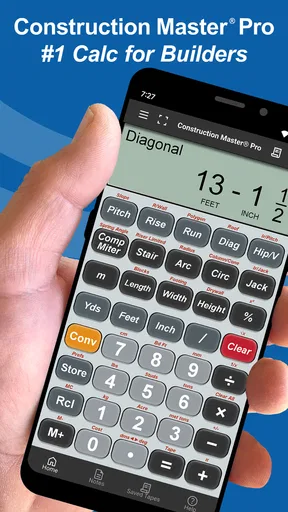
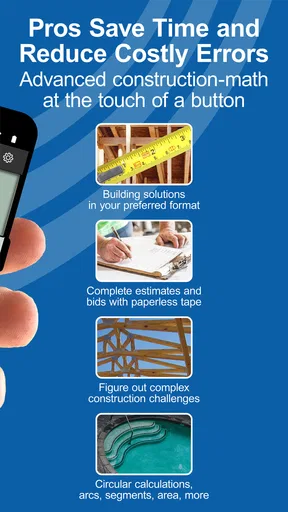

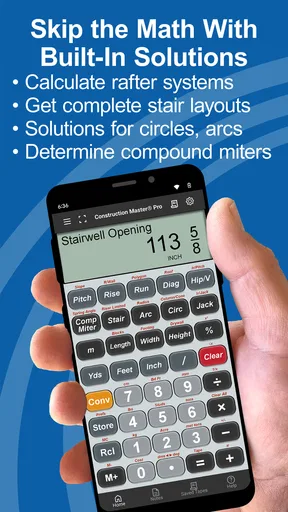
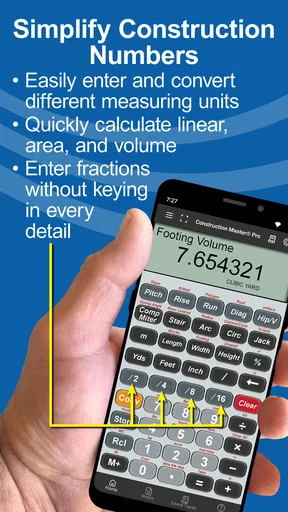
 Analysis by AppCompare
When I’m choosing a construction calculator, I care less about a long feature list than about whether I can enter a measurement naturally, check the result quickly, and trust the calculation before it affects materials or a cut. Construction Master Pro Calc is built for that kind of work: it’s a focused tools app from Calculated Industries, rather than a general calculator with construction functions bolted on.
That focus is its main advantage, but it also sets the right expectation. I’d consider it for frequent work with building measurements and trade calculations; I wouldn’t choose it just to do occasional everyday arithmetic. The app is free to download, with in-app purchases ranging from $0.49 to $39.99 per item, so it makes sense to try the basic experience before deciding whether any paid option suits your needs.
Choose by the work you actually do
The useful question is not simply whether you need a calculator, but how often you handle feet, inches, fractions, area, volume, or construction-specific problems such as stairs and rafters. If those come up throughout your day, a dedicated construction calculator can save repeated conversions and make common workflows feel more direct than switching between a basic calculator and notes.
For a homeowner measuring one room or checking a single cut, a standard calculator may be enough. The difference becomes more meaningful when measurements recur across a project: repeated entries, varied units, and quick checks are where a specialist tool earns its place. I’d also keep a separate written record for consequential figures. A convenient calculation history or saved result can help with reference, but it is not a substitute for a clear project note that another person can verify.
There is a learning trade-off, too. A dedicated calculator is most useful once you know what result you need and how to describe the dimensions going into it. If you are still learning construction terminology, the app can help with arithmetic, but it cannot decide whether your measurements or assumptions are appropriate for the job.
Where the dedicated calculator earns its place
First things first, downloading the Construction Master Pro Calc app is a breeze. Available on both Android and iOS, it’s just a quick tap away. Once installed, you’re greeted with a clean, intuitive interface. I was pleasantly surprised by how user-friendly it is, given the complexity of the calculations it handles. Whether you’re a seasoned pro or a newbie, you’ll find navigating through the app straightforward.
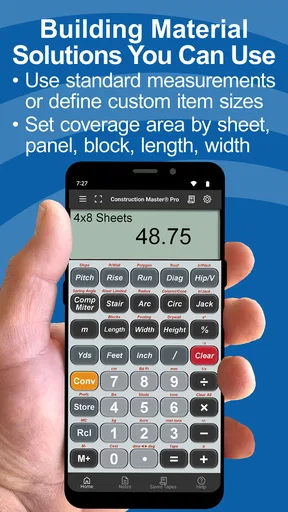
After a quick setup, I dived into the features. The app is packed with an array of functions tailored for construction professionals, from carpenters to engineers. It covers everything from basic math to advanced calculations like rafters, stairs, and even circular calculations. Trust me, it’s like having a Swiss Army knife in your pocket—but for math!
Worth Reading Before You Choose

EA SPORTS FC Mobile 26 Is a Bigger Football Game, but It Takes Time

Flipboard Shows What News Apps Must Do Beyond the Feed

Switching to Android Auto Means Rethinking Your Driving Routine

Google Calendar Makes a Crowded Week Easier to Manage

Ludo King Makes the Most of the Minutes Between Plans

Baby Panda World Brings Quick Play to Modern Phones, but Its Game Library Feels Busy
A Deep Dive into Features
Now, let’s talk about the nitty-gritty. One of the standout features is its ability to handle feet-inch-fraction conversions seamlessly. If you’ve ever had to manually convert these, you’ll understand the sheer joy this brings. I found myself breezing through calculations that used to take me ages with a manual calculator.
The app also excels in unit conversions. Whether you’re dealing with meters, yards, or any other unit, the app has got you covered. I tested it with a few real-life scenarios, and it didn’t miss a beat. Plus, the dedicated buttons for common calculations like area and volume are a nice touch.
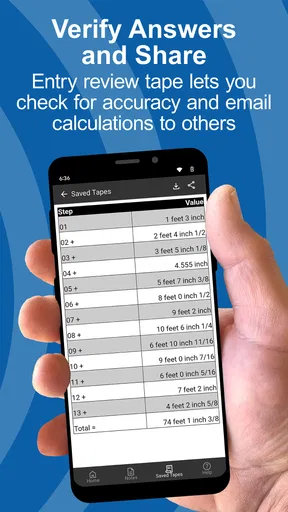
Another feature that caught my eye is the ability to save calculations. This is super handy when you’re juggling multiple projects or need to revisit a specific calculation. It’s like having a mini archive of your work right at your fingertips.
A practical routine on site
Picture a straightforward but busy morning: I need to check a stair measurement, work out a floor area, and confirm a material quantity while someone is waiting for the answer. The value here is being able to keep the measurements in construction-friendly units instead of translating each one mentally before using a generic calculator. I can focus on checking the inputs and whether the result makes sense, rather than spending the time converting fractions by hand.
A useful habit is to enter one measurement at a time and pause to confirm the units before moving on. That small check matters because a correct calculation can still lead to a bad decision if a dimension was entered in the wrong unit or copied incorrectly. For a repeat task, saving a calculation gives me a point of reference, but I would label the surrounding project notes separately so I don’t confuse one room, stair, or wall with another later.
For quantities such as bricks or other materials, I treat the result as a planning estimate rather than an automatic order. The calculation can help me work out the relevant dimensions and area, while the final quantity still depends on the actual layout, cuts, breakage, and the way the job is built. That distinction is important: the app helps with the math, not with site-specific judgement.
Real-World Application
So, how does Construction Master Pro Calc hold up in the field? Pretty darn well, if you ask me. I took it along to a job site, and it proved to be a lifesaver. Whether I was calculating the rise and run of a staircase or figuring out the exact number of bricks needed for a wall, the app delivered accurate results without any hiccups.
One thing I really appreciated was the app’s speed. In the fast-paced world of construction, time is money, and every second counts. The app’s quick calculations allowed me to make decisions on the fly without holding up the workflow.
Moreover, the app’s offline functionality is a game-changer. Let’s face it, not every construction site has reliable internet, and being able to use the app without connectivity is a huge plus.
Where other options may fit better
Compared with a basic phone calculator, this app is a better match when the calculation itself involves familiar construction measurements and repeated unit conversions. A general calculator remains perfectly reasonable for simple sums, percentages, or a one-off measurement; it is also a less specialised choice if you don’t want to learn a trade-oriented keypad and workflow.
A physical construction calculator may suit someone who prefers dedicated hardware, a tactile keypad, or a tool kept with other site equipment. I wouldn’t assume an app can replace that preference. On the other hand, a phone app is convenient when the phone is already at hand and you want one less separate item to carry. For larger project planning, spreadsheets or specialist design software are a better fit for organizing many materials, costs, and revisions together. This calculator’s strength is performing calculations, not managing an entire project.
If you are working on a calculation where safety, code compliance, or structural design is involved, use the app as a calculator rather than as an authority. Check the inputs and have the work reviewed through the appropriate professional process. Fast arithmetic is useful, but it does not validate the assumptions behind a design.
Ease of Use and Design
Design-wise, the app is sleek and efficient. The buttons are large and easy to press, even if you’ve got gloves on. I found the overall layout to be intuitive, with everything placed exactly where you’d expect it to be. There’s no clutter, just a straightforward tool designed to get the job done.
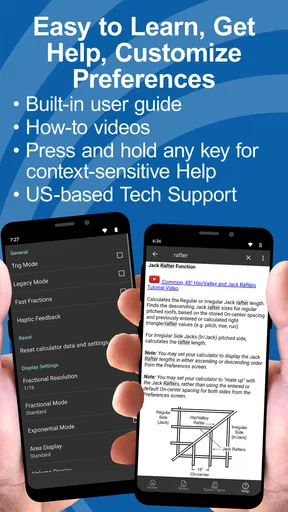
The app also includes a comprehensive help section. I didn’t find myself needing it much, but it’s reassuring to know it’s there if you get stuck on a tricky calculation.
The practical question for a new user is whether the construction-specific controls feel familiar. I’d spend a few quiet minutes trying the kinds of entries I use most before relying on it under pressure. That makes it easier to spot where a function lives and to notice if I have misunderstood an input convention. The app is aimed at everyone in its age-rating classification, but its usefulness still depends on knowing what you are calculating.
Compatibility, cost, and the switch
The app first appeared on December 13, 2010, and its current version is 10.20.8. It requires Android 12 or later on Android devices. It has a 4.7 average from around 9.4 thousand ratings, with roughly 1.6 thousand written reviews and over 100 thousand installs. Those figures suggest that it has found an audience among people looking for a dedicated construction calculator, although popularity alone doesn’t tell me whether its workflow will suit yours.
Because it is free to download, trying it is a relatively low-commitment way to see whether its approach works for you. The listed in-app purchase range runs from $0.49 to $39.99 per item; I’d check the purchase details in the app before paying and base that decision on the functions you actually need. If your current routine already works reliably, there is no reason to move every calculation over at once. Start with a familiar task, compare the result with your usual method, and switch only if the dedicated controls save time without adding confusion.
One sensible transition is to keep your existing calculator or paper method nearby for the first few jobs. That is not because the app is hard to use, but because any new input habit can create avoidable mistakes when adopted in a hurry. Once you trust your routine for common conversions and calculations, it becomes easier to use it as your everyday tool rather than as an occasional backup.
Final Thoughts
All in all, Construction Master Pro Calc is a robust tool for anyone in the construction industry. It’s practical, reliable, and incredibly efficient, turning daunting calculations into a walk in the park. While it might not replace your trusty old construction calculator entirely, it’s a fantastic supplement that you’ll find yourself reaching for time and time again.
If you’re looking to streamline your workflow and reduce errors on the job, this app is definitely worth a try. It’s a small investment for a tool that could save you a lot of headaches—and possibly a few arguments with your team!
So, what are you waiting for? Give Construction Master Pro Calc a try and see how it can revolutionize your work process. Happy building!
My recommendation is straightforward: try it if construction measurements and conversions are a regular part of your work, and judge it on a task you already know how to check. It is a sensible companion for quick calculations on site, especially when internet access is unreliable, but it is not a project manager, a substitute for sound measurement, or a replacement for professional review where that is needed. If you mainly need ordinary arithmetic, a simpler calculator will likely feel more direct; if construction math is part of your routine, this is the kind of focused tool I’d keep close.
Pros
- Highly accurate for complex calculations.
- User-friendly interface for quick access.
- Comprehensive unit conversion options.
- Regular updates enhance functionality.
- Offline access for remote job sites.
Cons
- Steep learning curve for beginners.
- Limited support for non-standard units.
- No free trial available.
- Interface can appear cluttered at times.
- Occasional minor bugs affect performance.
FAQs for Construction Master Pro Calc
What features does Construction Master Pro Calc offer?
Construction Master Pro Calc provides a comprehensive suite of tools for construction professionals, including advanced math functions, unit conversions, and layout solutions. It supports both metric and imperial units, making it versatile for different regions. The app also offers features like right-angle calculations and circular measurements, enhancing its utility on various construction projects.
Is Construction Master Pro Calc user-friendly for beginners?
Yes, Construction Master Pro Calc is designed with an intuitive interface suitable for both beginners and experienced users. The app includes a helpful tutorial and a detailed user guide to assist new users in navigating its features. Additionally, the clean layout ensures that functions are easily accessible, minimizing the learning curve.
How accurate is the Construction Master Pro Calc?
Construction Master Pro Calc is known for its precision and reliability, matching the accuracy of its physical calculator counterpart. It ensures accurate measurements and conversions, which are critical for successful project outcomes. Users can trust the app to deliver consistent and dependable results in various construction scenarios.
Does Construction Master Pro Calc require an internet connection?
No, Construction Master Pro Calc functions offline, making it ideal for use in remote locations where internet access may be limited. All calculations and conversions are handled within the app, allowing users to work efficiently without worrying about connectivity issues.
Is Construction Master Pro Calc available on both Android and iOS?
Yes, Construction Master Pro Calc is available for download on both Android and iOS platforms. This cross-platform availability ensures that users can access its powerful features regardless of their device preference, maintaining consistency and flexibility across different operating systems.


